

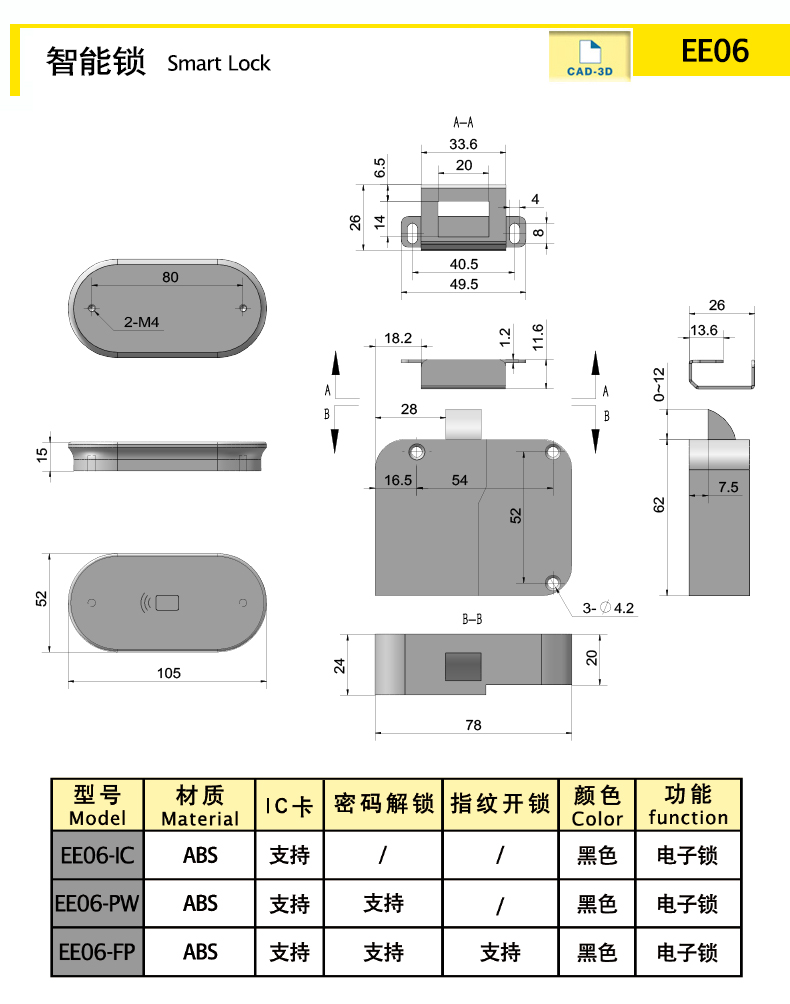
1. Ultra thin panel design, beautiful and generous
2. Convenient fingerprint, password, and card swiping settings
3. Precision fingerprint recognition sensor, safe and reassuring
4. Powered by 4 No. 7 batteries for long-lasting use
5. Can be easily installed using the original locking hole
Swipe card settings
1. A total of 100 M1 cards can be registered by swiping the card
2. Short press the reset hole once with the registration needle for 1 second, and with a beep, immediately swipe the card to register successfully. If the registration fails, click "Didi"
3. Please repeat step 2 for the registration of the second card
Clear Settings
1. Press and hold the reset hole for more than 5 seconds for the registration needle. If the red and blue dual colors flash, a long beep of "Didi Di" indicates clearing all card, fingerprint, and password settings
The unlocking method when the battery is out of charge
1: When the battery is at a low voltage, there will be a continuous beeping sound when unlocking to indicate that the voltage is too low
2: When the voltage of the lock battery is insufficient, an external power supply can be used to emergency open the door
Material:ABS
1. Ultra thin panel design, beautiful and generous
2. Convenient fingerprint, password, and card swiping settings
3. Precision fingerprint recognition sensor, safe and reassuring
4. Powered by 4 No. 7 batteries for long-lasting use
5. Can be easily installed using the original locking hole
Swipe card settings
1. A total of 100 M1 cards can be registered by swiping the card
2. Short press the reset hole once with the registration needle for 1 second, and with a beep, immediately swipe the card to register successfully. If the registration fails, click "Didi"
3. Please repeat step 2 for the registration of the second card
Clear Settings
1. Press and hold the reset hole for more than 5 seconds for the registration needle. If the red and blue dual colors flash, a long beep of "Didi Di" indicates clearing all card, fingerprint, and password settings
The unlocking method when the battery is out of charge
1: When the battery is at a low voltage, there will be a continuous beeping sound when unlocking to indicate that the voltage is too low
2: When the voltage of the lock battery is insufficient, an external power supply can be used to emergency open the door
IC version: equipped with 1 IC card and 2 NFC keychains (not applicable for metal cabinets and stone cabinets) The keychain is suitable for doors with a thickness of less than 2.5CM; If the door thickness is over 2.5CM, please use an IC card
No. 1389 Kaiming Road, Economic Development Zone, Laizhou City, Shandong Province

